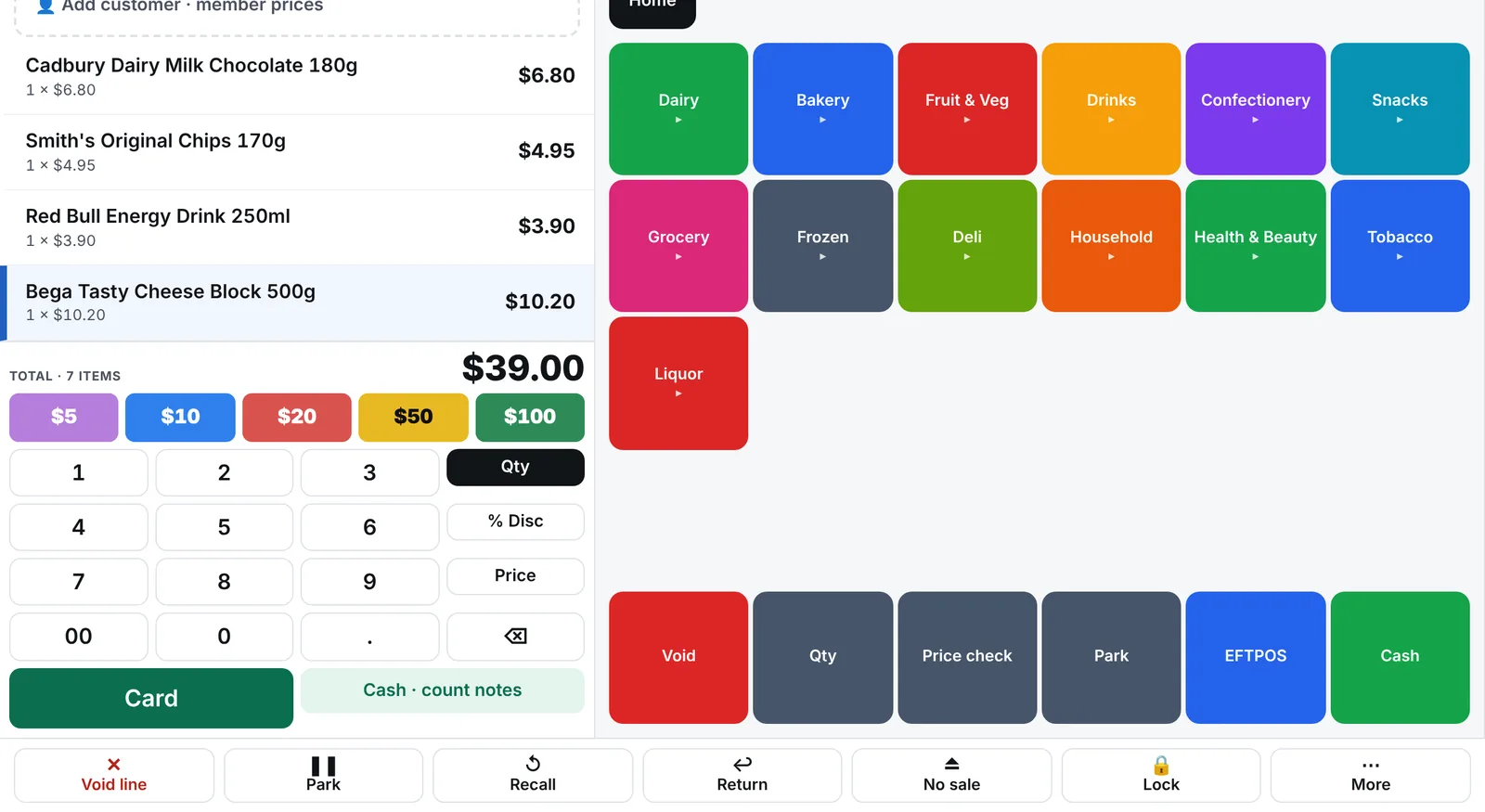
A till that keeps selling when the internet is down
Fast, touch-first checkout on the Windows PCs you already own. Every till holds its own copy of your store, so a dropped connection never stops a sale.
No. Each till stores products, prices, promotions, staff and customer accounts locally. Scanning, weighing, cash, card and receipts all work offline; sales queue and upload by themselves when the connection returns.
The status bar shows how many sales are waiting to upload
Price changes made while a till is offline arrive the moment it reconnects
Nothing to back up on the till: the cloud holds the master copy
What hardware does it run on?
Any Windows 10 or 11 touchscreen PC, from a 10-inch tablet-style screen to a 24-inch monitor. The layout adapts to the screen and you can drag the panels to resize them.
Barcode scanners (USB keyboard-style)
Receipt printers and cash drawers
Scales and price-embedded barcodes from deli and produce scales
A second screen as a customer display with your promotions
How do age checks work for tobacco and alcohol?
Products marked 18+ ask the cashier to confirm the customer's age before the sale continues, and the check is recorded on the sale. There are no trading-hours locks; your store opens when you do.
What can staff do without a manager?
You decide. Refunds, voids, discounts, price overrides, no-sales and cash outs can each require a manager's PIN. Every one is logged and can trigger an alert to your phone.
Which payments does it take?
Cash (tap the notes the customer handed over and see the change), card on your choice of EFTPOS terminal (Tyro, bank terminals, Windcave, Smartpay, Zeller and more), gift cards, loyalty points, customer accounts and fuel cards. Terminals work standalone today; integrated payments arrive provider by provider, starting with Linkly and Tyro.
Common questions
How do I set up a new till?
+
Install the till app on the Windows PC, create the till in the back office and type its 9-digit pairing code on the till. It downloads your products, prices, promotions, staff and screen layout, and it's ready to sell.
Can I change the till screen layout?
+
Yes. Choose from preset layouts, move and resize panels by dragging, and set up quick keys for your fast sellers, fruit and veg, and agency lines like lottery and recharge.
How do staff log in?
+
With a personal 6–8 digit PIN. Each staff member's sales, refunds and voids are recorded against their name, and you control what each person can do.